rumdl




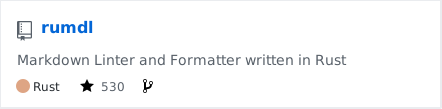
rumdl is a high-performance Markdown linter and formatter that helps ensure consistency and best practices in your Markdown files. Inspired by ruff 's approach to Python linting, rumdl brings similar speed and developer experience improvements to the Markdown ecosystem.
Key Features:
- Built for speed with Rust - significantly faster than alternatives
- 57 lint rules covering common Markdown issues
- Automatic formatting with --fix for files and stdin/stdout
- Zero dependencies - single binary with no runtime requirements
- Highly configurable with TOML-based config files
- Multiple installation options - Rust, Python, standalone binaries
- Installable via pip for Python users
- Modern CLI with detailed error reporting
- CI/CD friendly with non-zero exit code on errors
rumdl documentation
- Version in MegaLinter: 0.1.62
- Visit Official Web Site
- See How to configure rumdl rules
- See How to disable rumdl rules in files
- See Index of problems detected by rumdl
Configuration in MegaLinter
- Enable rumdl by adding
MARKDOWN_RUMDLin ENABLE_LINTERS variable - Disable rumdl by adding
MARKDOWN_RUMDLin DISABLE_LINTERS variable
- Enable autofixes by adding
MARKDOWN_RUMDLin APPLY_FIXES variable
| Variable | Description | Default value |
|---|---|---|
| MARKDOWN_DEFAULT_STYLE | For rumdl to be active, MARKDOWN_DEFAULT_STYLE must be rumdl |
markdownlint |
| MARKDOWN_RUMDL_ARGUMENTS | User custom arguments to add in linter CLI call Ex: -s --foo "bar" |
|
| MARKDOWN_RUMDL_COMMAND_REMOVE_ARGUMENTS | User custom arguments to remove from command line before calling the linter Ex: -s --foo "bar" |
|
| MARKDOWN_RUMDL_FILTER_REGEX_INCLUDE | Custom regex including filter Ex: (src\|lib) |
Include every file |
| MARKDOWN_RUMDL_FILTER_REGEX_EXCLUDE | Custom regex excluding filter Ex: (test\|examples) |
Exclude no file |
| MARKDOWN_RUMDL_CLI_LINT_MODE | Override default CLI lint mode - file: Calls the linter for each file- list_of_files: Call the linter with the list of files as argument- project: Call the linter from the root of the project |
list_of_files |
| MARKDOWN_RUMDL_FILE_EXTENSIONS | Allowed file extensions. "*" matches any extension, "" matches empty extension. Empty list excludes all filesEx: [".py", ""] |
[".md"] |
| MARKDOWN_RUMDL_FILE_NAMES_REGEX | File name regex filters. Regular expression list for filtering files by their base names using regex full match. Empty list includes all files Ex: ["Dockerfile(-.+)?", "Jenkinsfile"] |
Include every file |
| MARKDOWN_RUMDL_PRE_COMMANDS | List of bash commands to run before the linter | None |
| MARKDOWN_RUMDL_POST_COMMANDS | List of bash commands to run after the linter | None |
| MARKDOWN_RUMDL_UNSECURED_ENV_VARIABLES | List of env variables explicitly not filtered before calling MARKDOWN_RUMDL and its pre/post commands | None |
| MARKDOWN_RUMDL_CONFIG_FILE | rumdl configuration file name Use LINTER_DEFAULT to let the linter find it |
.rumdl.toml |
| MARKDOWN_RUMDL_RULES_PATH | Path where to find linter configuration file | Workspace folder, then MegaLinter default rules |
| MARKDOWN_RUMDL_DISABLE_ERRORS | Run linter but consider errors as warnings | true |
| MARKDOWN_RUMDL_DISABLE_ERRORS_IF_LESS_THAN | Maximum number of errors allowed | 0 |
| MARKDOWN_RUMDL_CLI_EXECUTABLE | Override CLI executable | ['rumdl'] |
IDE Integration
Use rumdl in your favorite IDE to catch errors before MegaLinter !
| IDE | Extension Name | Install | |
|---|---|---|---|
| Visual Studio Code | rumdl - Markdown Linter |  |
MegaLinter Flavors
This linter is available in the following flavors
| Flavor | Description | Embedded linters | Info | |
|---|---|---|---|---|
 |
all | Default MegaLinter Flavor | 134 |   |
| c_cpp | Optimized for pure C/C++ projects | 56 |   |
|
| cupcake | MegaLinter for the most commonly used languages | 89 |   |
|
| documentation | MegaLinter for documentation projects | 49 |   |
|
| dotnet | Optimized for C, C++, C# or VB based projects | 64 |   |
|
| dotnetweb | Optimized for C, C++, C# or VB based projects with JS/TS | 73 |   |
|
| formatters | Contains only formatters | 19 |   |
|
| go | Optimized for GO based projects | 51 |   |
|
| java | Optimized for JAVA based projects | 54 |   |
|
| javascript | Optimized for JAVASCRIPT or TYPESCRIPT based projects | 59 |   |
|
| php | Optimized for PHP based projects | 54 |   |
|
| python | Optimized for PYTHON based projects | 66 |   |
|
| ruby | Optimized for RUBY based projects | 50 |   |
|
| rust | Optimized for RUST based projects | 50 |   |
|
| salesforce | Optimized for Salesforce based projects | 56 |   |
|
| swift | Optimized for SWIFT based projects | 50 |   |
|
| terraform | Optimized for TERRAFORM based projects | 54 |   |
Behind the scenes
How are identified applicable files
- File extensions:
.md
How the linting is performed
- rumdl is called once with the list of files as arguments (
list_of_filesCLI lint mode)
Example calls
rumdl check myfile.md
rumdl check --fix myfile.md
rumdl check --fix myfile.md myfile2.md myfile3.md
Help content
A fast Markdown linter written in Rust (Ru(st) MarkDown Linter)

Usage: rumdl [OPTIONS] <COMMAND>

Commands:
  check        Lint Markdown files and print warnings/errors
  fmt          Format Markdown files (alias for check --fix)
  init         Initialize a new configuration file
  rule         Show information about a rule or list all rules
  explain      Explain a rule with detailed information and examples
  config       Show configuration or query a specific key
  server       Start the Language Server Protocol server
  schema       Generate or check JSON schema for rumdl.toml
  import       Import and convert markdownlint configuration files
  vscode       Install the rumdl VS Code extension
  completions  Generate shell completion scripts
  clean        Clear the cache
  version      Show version information
  help         Print this message or the help of the given subcommand(s)

Options:
      --color <COLOR>    Control colored output [default: auto] [possible values: auto, always, never]
      --config <CONFIG>  Path to configuration file
      --no-config        Ignore all configuration files and use built-in defaults
      --isolated         Ignore all configuration files (alias for --no-config)
  -h, --help             Print help
  -V, --version          Print version
Installation on mega-linter Docker image
- Dockerfile commands :
# renovate: datasource=pypi depName=rumdl
ARG PIP_RUMDL_VERSION=0.1.62
- PIP packages (Python):