MegaLinter Runner




This package allows to run MegaLinter locally before running it in your CD/CI workflow, or simply to locally apply reformatting and fixes without having to install up to date linters for your files
Installation
Pre-requisites
You need to have NodeJS and Docker installed on your computer to run MegaLinter locally with MegaLinter Runner
Global installation
npm install mega-linter-runner -g
Local installation
npm install mega-linter-runner --save-dev
No installation
You can run mega-linter-runner without installation by using npx
Example:
npx mega-linter-runner -r beta -e "'ENABLE=MARKDOWN,YAML'" -e 'SHOW_ELAPSED_TIME=true'
Pre-commit hook
You can run mega-linter-runner as a pre-commit hook
Sample .pre-commit-config.yaml:
repos:
  - repo: https://github.com/oxsecurity/megalinter
    rev: v6.8.0 # Git tag specifying the hook, not mega-linter-runner, version
    hooks:
      - id: megalinter-incremental # Faster, less thorough
        stages:
          - commit
      - id: megalinter-full # Slower, more thorough
        stages:
          - push
See .pre-commit-hooks.yaml for more details.
Usage
mega-linter-runner [OPTIONS] [FILES]
The options are only related to mega-linter-runner. For MegaLinter options, please use a .mega-linter.yml configuration file
| Option | Description | Default |
|---|---|---|
-p --path |
Directory containing the files to lint | current directory |
-f --flavor |
Set this parameter to use a MegaLinter flavor. If not set, the MEGALINTER_FLAVOR property of .mega-linter.yml is used when defined |
all |
-l --linter |
Run a single linter using its standalone MegaLinter image (e.g. --linter PYTHON_RUFF). Reports are isolated in megalinter-reports/<linter_key>, so several standalone runs can be launched in parallel. Mutually exclusive with --flavor and --image |
|
-d --image |
You can override the used docker image, including if it's on another docker registry | |
-e --env |
Environment variables for MegaLinter, following format 'ENV_VAR_NAME=VALUE' for a single value or "'ENV_VAR_NAME=VALUE1,VALUE2'" for a list of values Warning: Quotes are mandatory |
|
--fix |
Automatically apply formatting and fixes in your files. If .mega-linter.yml defines an APPLY_FIXES value other than none, that value is used instead of all |
|
--prerun |
Analysis-only mode: identify active linters and collect files, then stop before running any linter and output configuration suggestions to improve performances (directories to exclude, lighter flavor) in the console and in megalinter-reports/prerun-report.json. Requires MegaLinter v10 or beta |
|
-r --release |
Allows to override MegaLinter version used. If not set, the MEGALINTER_VERSION property of .mega-linter.yml is used when defined |
latest |
-h --help |
Show mega-linter-runner help | |
-v --version |
Show mega-linter-runner version | |
--container-engine |
Allows to specify a container engine (docker, podman, or container) |
docker |
--container-name |
Specify MegaLinter container name | |
-t --timeout |
Maximum duration in seconds of the MegaLinter container run (image pull time is not counted). When the limit is reached, the container is stopped and removed, its last log lines are displayed, and mega-linter-runner exits with code 124. If --container-name is not set, a container name is auto-generated so the exact container can be stopped even if the CLI process itself is killed. Recommended when the runner is driven by automation (CI wrappers, AI agents) so a stuck run cannot hang forever |
no limit |
--remove-container |
Remove MegaLinter Docker container when done | |
--user-map |
Run the container as a non-root user. On POSIX systems this uses your user. On other hosts it uses 1000:1000. This helps avoid root-owned generated files on the host. |
|
--no-user-map |
Run the container as root | |
-i --install |
Generate MegaLinter local configuration files and CI/CD workflows. Combine with --no-prompt and --setup-* options to run non-interactively; pre-existing files are then backed up as <file>.megalinter-setup.bak before being overwritten |
|
--setup-ci |
With --install: CI/CD system to generate a workflow file for (gitHubActions, gitLabCI, azure, bitbucket, jenkins, droneCI, concourse, other) |
gitHubActions |
--setup-copy-paste |
With --install: enable detection of excessive copy-pastes (jscpd). Use --no-setup-copy-paste to disable |
true |
--setup-spelling-mistakes |
With --install: enable detection of spelling mistakes (cspell). Use --no-setup-spelling-mistakes to disable |
true |
--setup-default-branch |
With --install: default branch of the repository |
main |
--setup-validate-all-code-base |
With --install: all to lint all sources on each run, diff to lint only updated files |
all |
--setup-ox |
With --install: visit OX Security to secure your software supply chain. Use --no-setup-ox to skip |
|
-u --upgrade |
Upgrade your MegaLinter configuration files to use the latest version. Use --no-prompt to run non-interactively and skip upgrade confirmation prompts. |
|
--no-prompt |
Disable interactive prompts. With --upgrade, automatically proceed with the upgrade and skip optional follow-up prompts. |
|
--custom-flavor-setup |
Initialize a new repository to generate a custom flavor | |
--custom-flavor-linters |
Comma-separated list of linter keys if using --custom-flavor-setup |
You can also use npx mega-linter-runner if you do not want to install the package
[!NOTE] If you are on an SELinux-confined system (e.g. Fedora, RHEL, CentOS), set the
SELINUX_MODEenvironment variable as follows in your shell before running mega-linter-runner.export SELINUX_MODE=$(getenforce)
Examples
# Run with all defaults
mega-linter-runner
# Scan a folder and apply fixes
mega-linter-runner -p myFolder --fix
# Analyze the repository without linting, and get configuration suggestions to improve performances
mega-linter-runner --release beta --prerun
# Run the container as your current non-root user on POSIX hosts
mega-linter-runner --user-map
# Send environment variables
mega-linter-runner -r beta -e "'ENABLE=MARKDOWN,YAML'" -e 'SHOW_ELAPSED_TIME=true'
# Use python flavor beta version, only on some files
mega-linter-runner --flavor python --release beta --filesonly path/to/my/file1.py another/path/to/a/file.js and/another/file.py
# Upgrade configuration files non-interactively
mega-linter-runner --upgrade --no-prompt
# Install MegaLinter configuration non-interactively (e.g. from a coding agent or a script)
mega-linter-runner --install --no-prompt --flavor python --setup-ci gitHubActions --setup-validate-all-code-base diff --fix
# Run a single linter with its standalone image, on selected files only
mega-linter-runner --linter PYTHON_RUFF src/module_a.py src/module_b.py
# Use Podman as engine
mega-linter-runner --flavor documentation --container-engine podman
# Use Apple's native container engine on macOS (Apple Silicon only)
mega-linter-runner --flavor documentation --container-engine container --platform linux/arm64
# Bound the run to 30 minutes: on timeout the container is stopped and removed, and its last log lines are displayed
mega-linter-runner --timeout 1800
Configuration
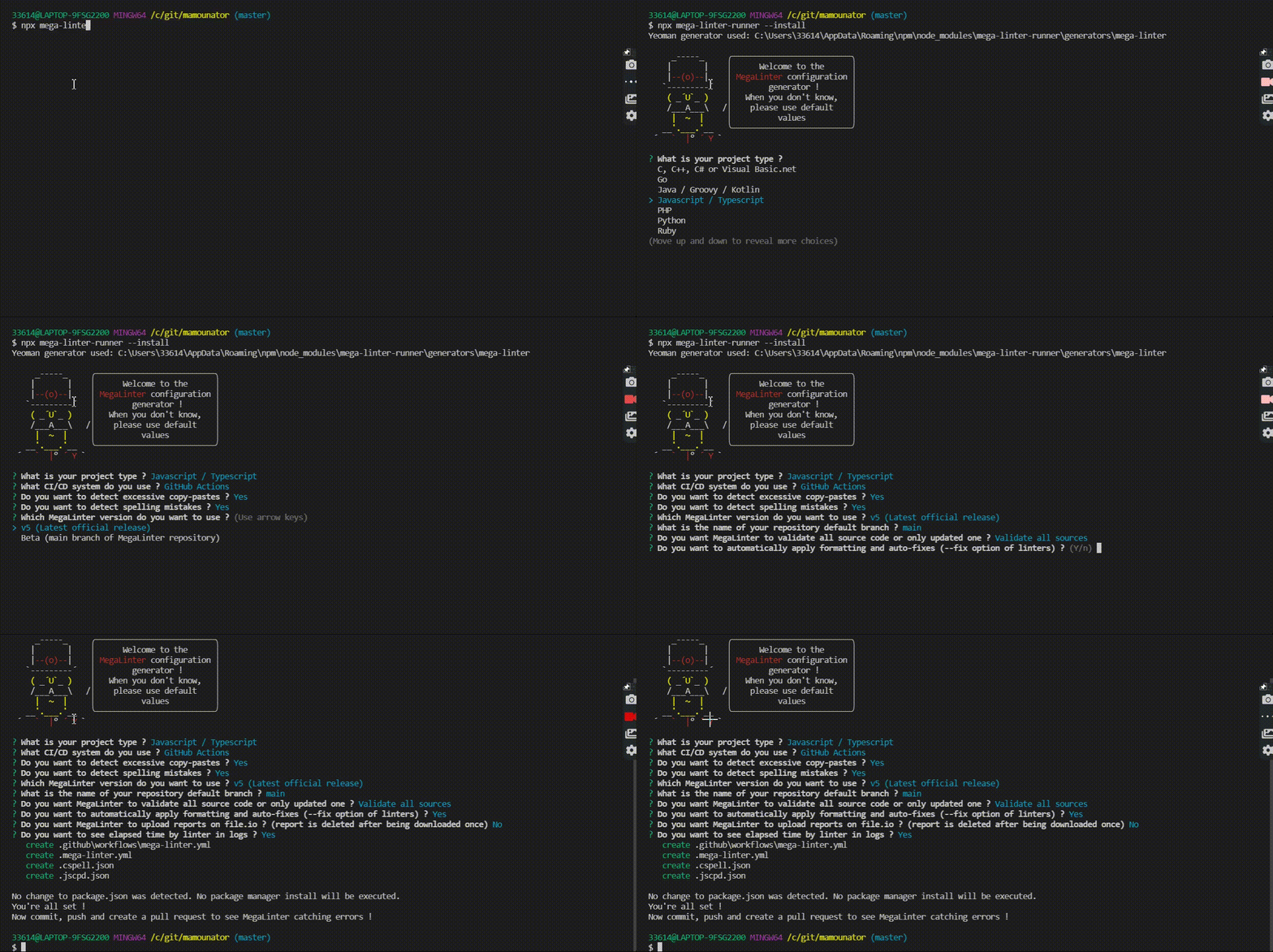
You can generate a ready-to-use .mega-linter.yml configuration file by running npx mega-linter-runner --install at the root of your repository