Datadog integration
Send MegaLinter results to Datadog (metrics + logs) and provision the MegaLinter dashboard in your Datadog organization.
Dashboard
MegaLinter - Overview: quality gate pass rate, blocking / non-blocking / auto-fixed errors, error and duration trends by repository, errors by linter, top rules, top files, and the live stream of MegaLinter runs.
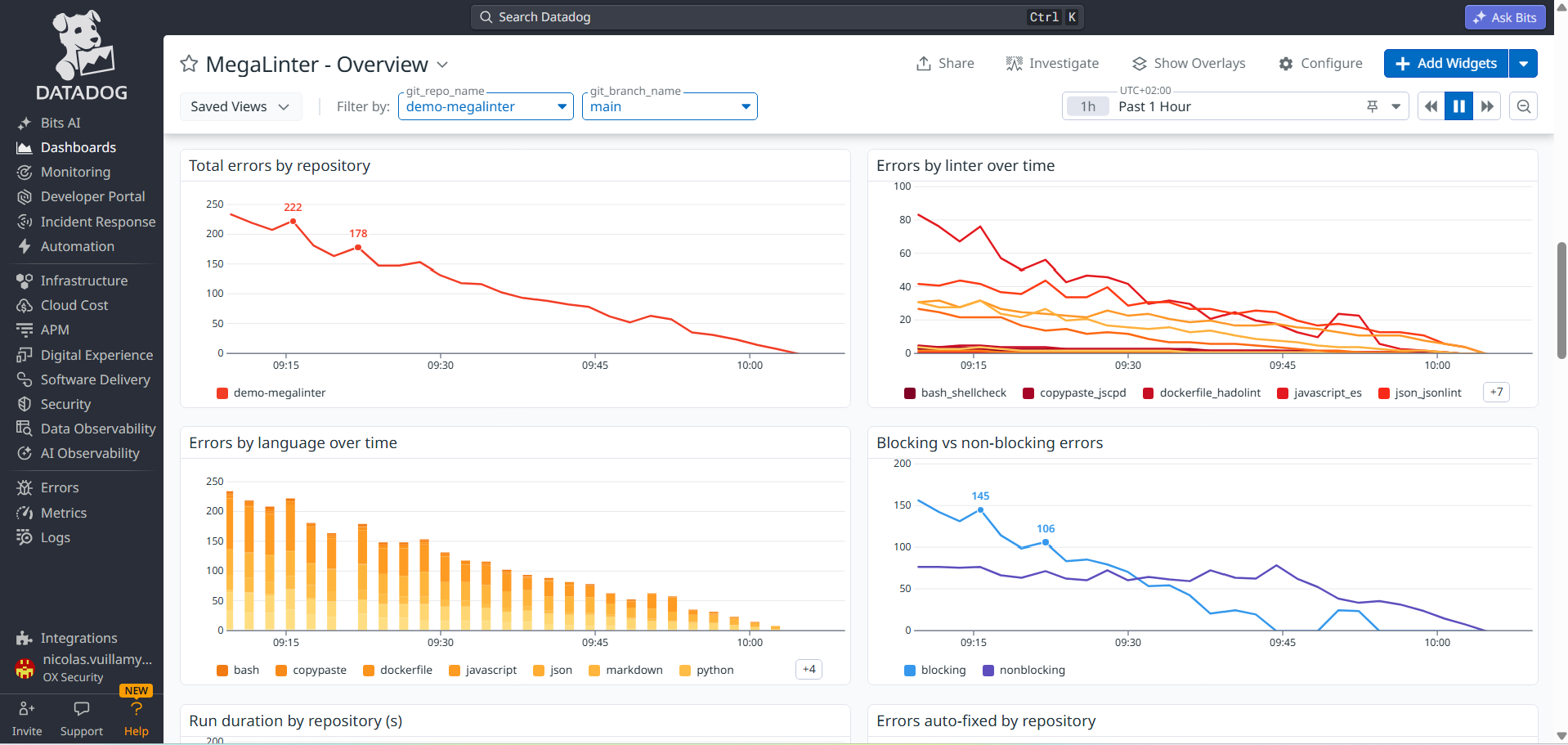
Provision it with:
DD_SITE=datadoghq.com DD_API_KEY=xxx DD_APP_KEY=yyy \
  npx mega-linter-runner --upload-dashboards datadog
| Variable | Description |
|---|---|
DD_SITE |
Datadog site (datadoghq.com, datadoghq.eu, us3.datadoghq.com...) — default datadoghq.com |
DD_API_KEY + DD_APP_KEY |
API key + application key |
DD_BEARER_TOKEN |
Service account bearer token (alternative to API + application keys) |
The upload is idempotent: the dashboard is matched by title and updated in place.
Sending data
API_REPORTER: true
API_REPORTER_PROVIDER: datadog
API_REPORTER_DATADOG_SITE: datadoghq.com # datadoghq.eu, us3.datadoghq.com...
| Variable | Description |
|---|---|
API_REPORTER_DATADOG_SITE |
Datadog site (default datadoghq.com) |
API_REPORTER_DATADOG_API_KEY |
Datadog API key (define it as a CI/CD secret) |
API_REPORTER_DATADOG_BEARER_TOKEN |
Service account bearer token, used when no API key is defined |
Data sent
- Metrics (gauge):
megalinter.run.*(run KPIs) andmegalinter.linter.*(per-linter), tagged withsource,org_identifier,git_identifier,git_repo_name,git_branch_name(+descriptor,linter,linter_key) — see the metrics reference - Logs (
source:megalinter): one event per run, per linter, per top rule and per top file, tagged withrecord_type(run,linter,rule,file), with the detailed payload under the@megalinter.*attributes
The dashboard has git_repo_name and git_branch_name template variables: select a repository and/or a branch to focus every widget on it, or use the Focus on this repository link on repository charts. Optionally, create facets on the @megalinter.* log attributes to get autocompletion in the Logs Explorer.